
|
|
Help on Connecting |
| Help | StartPage | |
| This is archived content. | |
Connecting to the Internet
FeedbackWe appreciate comments that help us improve this page. |
What are the steps to connect to the internet?To set up your computer for dialing into NCF, please follow the step by step instructions for the type of system you use:
What phone number do I use to dial into NCF?
What equipment do I need?You need a computer with a modem, and a telephone line. If you are buying a new computer, your system will probably have everything you need. If you are buying a used computer, a basic system could be a Pentium-133 with 64MB memory, a 2GB disk, a modem of 14.4Kbps (minimum) to 56Kbps (56Kbps is recommended to take advantage of NCF's 56Kbps lines), a video card, and Windows 95 or Windows 98. However, you can still send and receive email with more modest equipment. For full graphics you will need a 'web browser' program such as Netscape or Internet Explorer. You'll probably want a Mail Reader program such as Microsoft Outlook Express, Netscape Mail, or Qualcomm Eudora which you can download at their websites. How much connection time can I get?NCF operates over 300 modem lines, shared by members. Connection time is unlimited from midnight to noon, and unlimited from noon to midnight unless all modems become busy. If all modems become busy, total connect time from noon to midnight may sum to at least two hours per day. 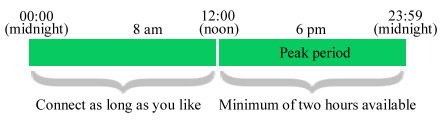
During non-peak time, from midnight to noon, you may connect for as long as you like. (In busy times, these connections may be limited to one hour at a time.) You can also connect for five minutes at a time to get/send your email anytime. Does NCF offer high-speed access to the Internet?Yes, NCF offers high-speed DSL internet access. DSL technology ('Digital Subscriber Line') gives you high-speed internet access over your existing telephone line, always available, without blocking your telephone. It's up to 50 times faster than a regular dialup connection. For more details, please see our DSL information page, where you can also sign up. |